

Many Windows laptop users face storage problems, especially those using devices with limited space like a 512GB SSD. Over time, junk files, browser cache, old downloads, and unused app data slowly build up. This often leads to low storage warnings and slower system performance.
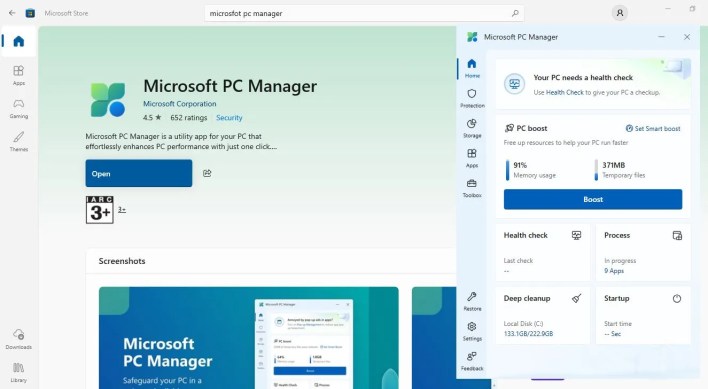
Windows does provide built-in tools such as Disk Cleanup and Storage Sense, but using them one by one can be confusing and time-consuming. Because of this, many users install third-party cleanup apps. However, most of these tools require a paid subscription for full features and can sometimes delete files too aggressively.
The good news is that Windows users do not need to rely on paid software. There is a free, official Windows tool that brings cleanup and performance features together in one place.
ALSO READ REDMI Note 15 5G to Launch in India on January 6 With 108MP Camera, 120Hz Display


Easy storage cleanup
The tool offers a deep cleanup scan that finds files safe to delete, such as temporary system files, browser cache, and thumbnail data. These files do not affect personal data or installed apps.
After the scan, users can clear the files with just a few clicks. In many cases, this helps free up several gigabytes of storage within seconds.
Another helpful feature is the option to find large and duplicate files. The tool scans the system and shows a list, allowing users to review everything before deleting it. This makes it easier to remove files that take up a lot of space without realising it.
There is also a downloads management option. Users can sort downloaded files by size, type, date, or browser, making it easy to delete old installers, ZIP files, and unused documents.
Performance and extra tools
Apart from cleanup, the tool also helps improve system performance. The deep uninstall feature removes apps along with leftover files and registry entries that are usually left behind after uninstalling apps through Windows Settings.
It also includes a pop-up blocker to stop unwanted ads, promotions, and notifications from apps. If needed, users can adjust the settings to block specific pop-ups.
Other useful tools include a network check to test internet connectivity and a process management feature to close background apps easily. Since it only shows user-installed apps, there is little risk of closing important system processes.
Overall, this free Windows tool offers a simple and safe way to clean storage and improve performance, without the need for paid third-party apps
We’re Live on WhatsApp! Join our channel for market insights & updates







3 Comments